00CUE 00:00Overview

A complete live production system, free and open source.

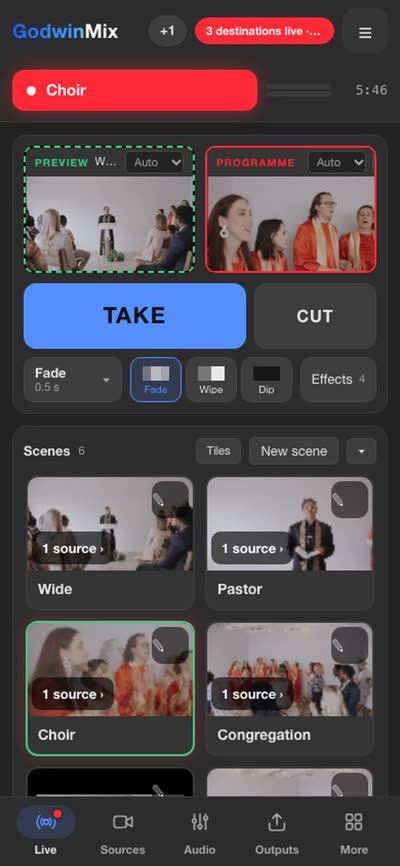
Cameras, phones, screens, graphics and web pages go in. You build scenes, cut between them with transitions, and send one programme to several platforms at once while it records. It runs on a laptop, on a server or in Docker. An AI agent can operate it, and the same core runs a headend of 52 channels. Ripeflow LLC sets it up and stays on call during your shows.

Windows, macOS (Apple silicon and Intel), Linux and Docker. Version 0.3.17. Apache 2.0.
THE REAL MIXER, RECORDED
▶ Watch the 92 second filmWith sound and captions
00:00:00On air on this page, no reconnects
4Cameras and a live score on one laptop, in the sports film
52Channels set up on one headend in production
$0Licence, for any use, including commercial
01CUE 00:30Use cases

One system for every kind of live show.

The problems below come from calls with the people who run these shows, in their words. Each card says what GodwinMix does about it and links to a film of the real mixer doing it.

Churches
“The stream has to reach YouTube, Facebook and our website, every week, with whoever volunteers.”

Backup shots for every camera, so a dropped cable never reaches the people at home. One computer feeds every platform, and a volunteer can run it from a phone.

Watch: when a camera dies

Schools and universities
“Graduation is live once a year and nobody remembers how it worked last time.”

A scene per camera, a link and QR code parents can open, and a recording to a file while it is live. The written steps under each film stay for the next person.

Watch: four cameras on one laptop
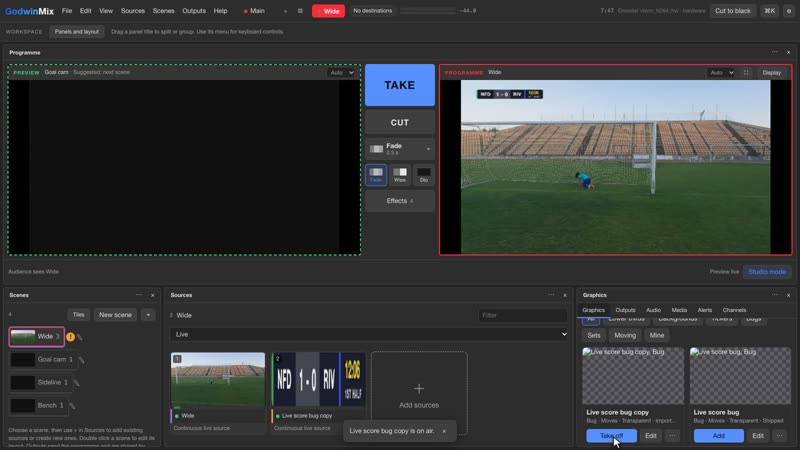
Sports and local leagues
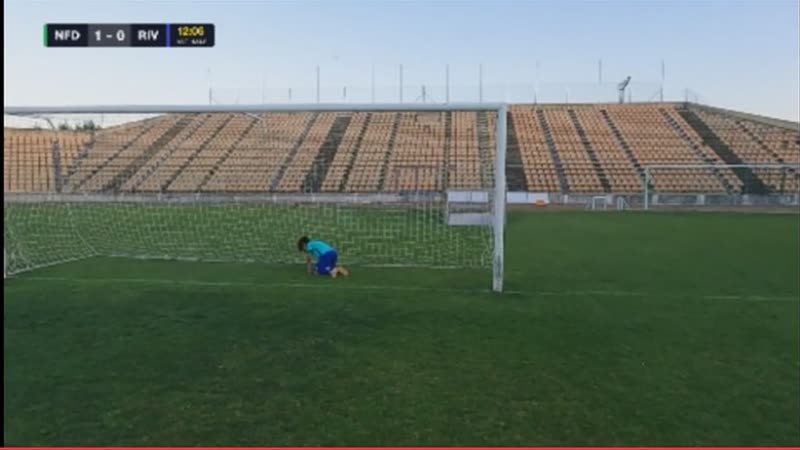
“Four cameras, a running score, and families watching on three different sites.”

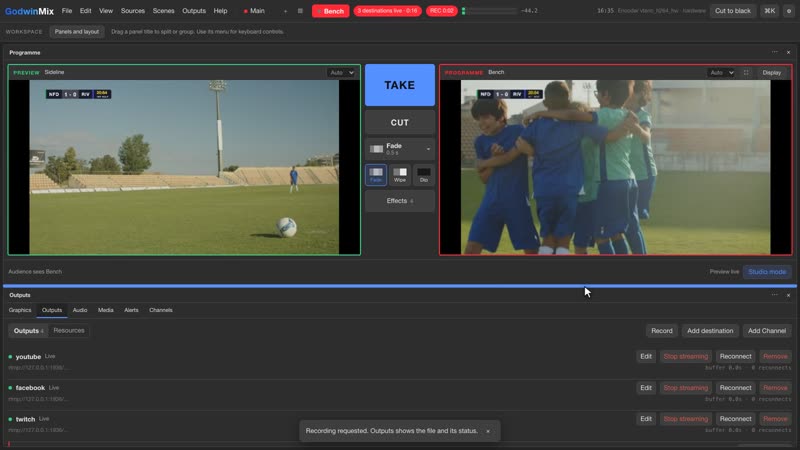
A live score bug from the graphics gallery, cuts with wipes and fades, and YouTube, Facebook and Twitch from the same programme.

Watch: stream a match with a live score
Events and conferences
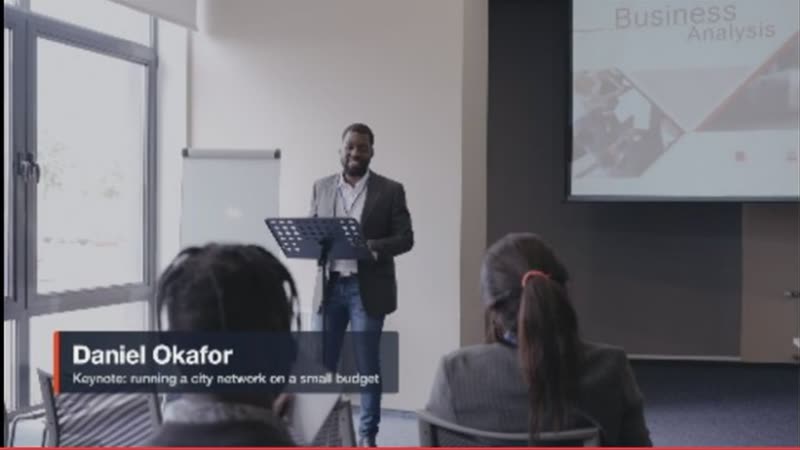
“The keynote starts in five minutes and the speaker's name is still not on screen.”

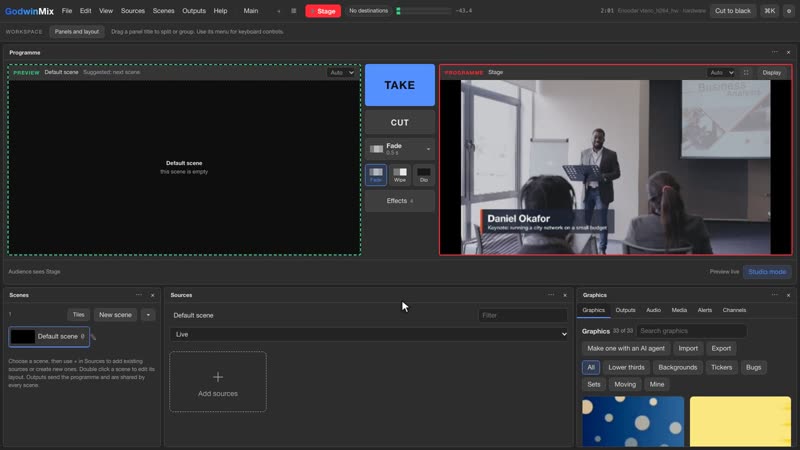
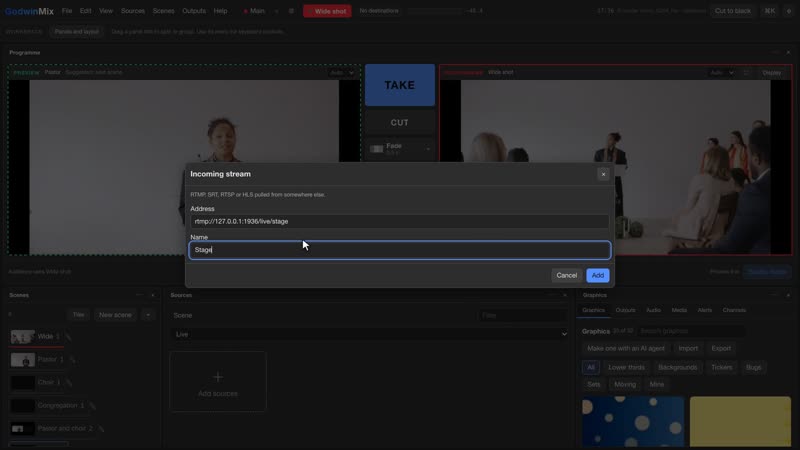
Lower thirds for every speaker, an AI agent that builds scenes and puts names up when you ask, and a backup camera for the stage.

Watch: ask an AI agent
Corporate town halls and webinars
“The CEO is in one office, the guest is remote, and it has to go to LinkedIn and the intranet.”

Guests join from a phone or a browser by link, the programme goes to LinkedIn Live, YouTube or your own HLS page, and the recording is ready when the call ends.

Watch: a guest from a phone
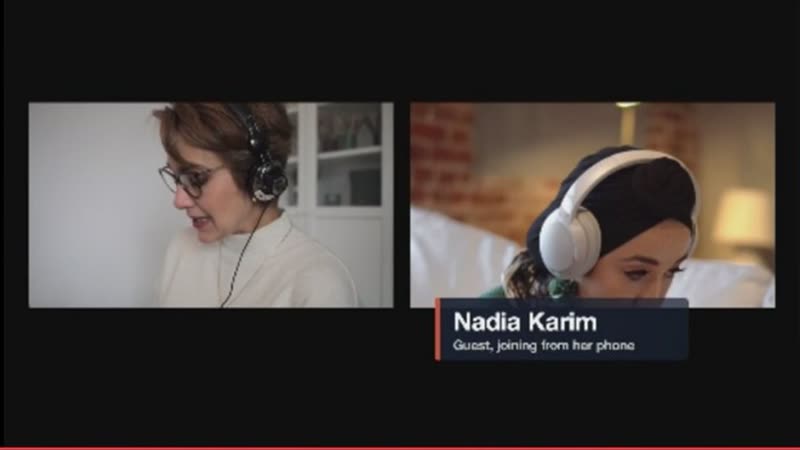
Podcasts and talk shows
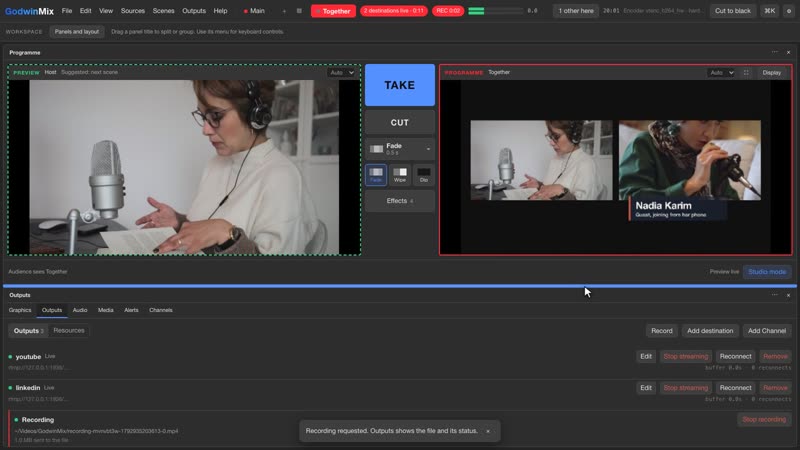
“My guest only has a phone, and I still want her beside me with her name under her picture.”

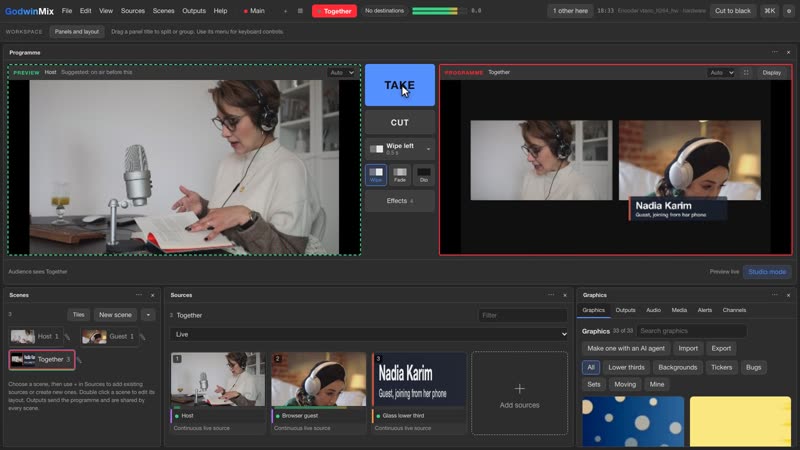
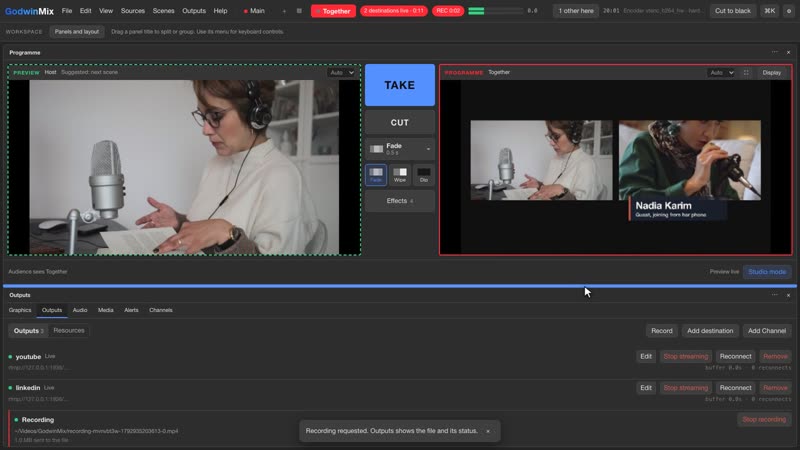
Send a code, she presses Go live, and a side by side scene with her name card goes on air with a wipe while it streams and records.

Watch: bring a guest in from a phone
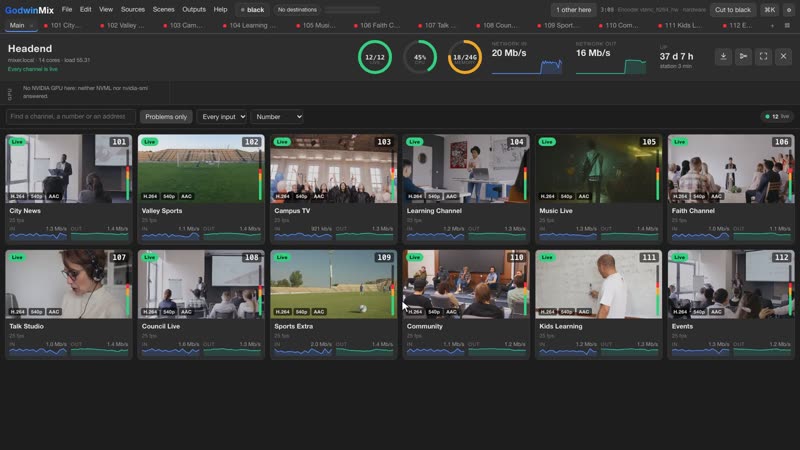
Broadcasters and channel operators
“Dozens of channels come in all day, and we want to know when one goes dark before the phone rings.”

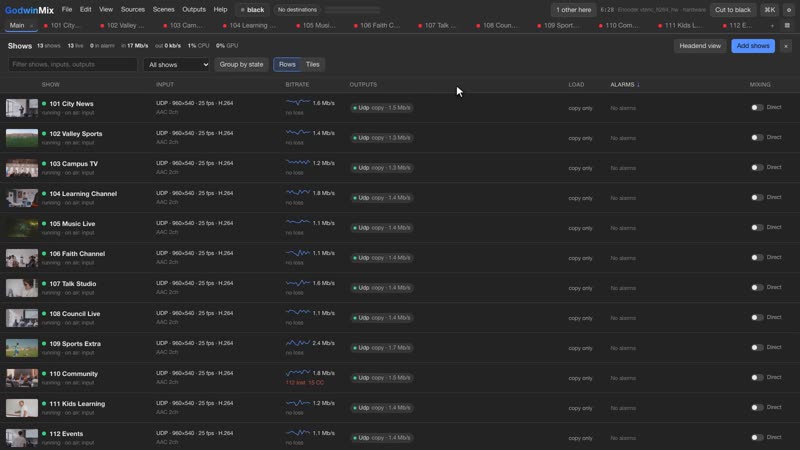
Direct shows from a CSV list, a headend view with every channel as a tile, alarms for offline, black, frozen and silent, and a flow map of the whole station.

Watch: a headend of many channels

Quotes are paraphrased from calls, without names. The pictures are from the films, recorded on GodwinMix with free stock footage, except the school card, which is a stock still.

02CUE 01:10What it costs

What a live show usually costs, and what changes.

Whoever runs the show, the same three costs come up on calls: equipment or licences before the first show, a subscription for each extra platform, and more crew than anyone has. Tick what your setup would need and see what GodwinMix takes off the bill.

What you would not buy

Tick what a typical setup would otherwise need. Prices are public list prices.

First year, avoided$3,037

GodwinMix itself costs nothing to license. You still need a computer, cameras and an internet connection, and you may want our setup or support, which are quoted separately. Sources: blackmagicdesign.com, vmix.com, restream.io, wirecast.io, read 25 October 2026.

A stream that stays up

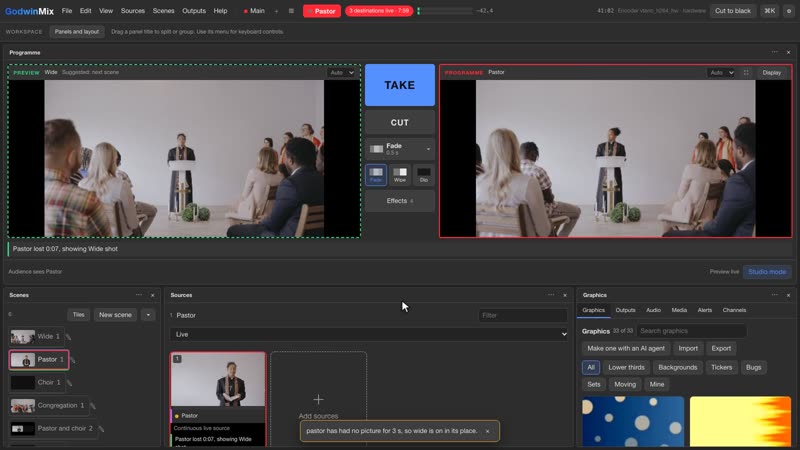
Give each camera a backup. When it drops, the backup dissolves in after three seconds and every platform stays live. Watch it below.

WIDESTAGECAM 3 MIXER STAGE YOUTUBEFACEBOOKWEBSITE
All cameras live

Fewer hands per show

The jobs that used to need a second person at the desk.

  • Someone at the front switches shots from a phone, with a code you can take back at any time.
  • Several people can operate at once, each on their own device.
  • An AI agent puts names on screen and checks the cameras when you ask in plain words.
  • Destinations reconnect by themselves. Nobody has to watch three platforms.
See the agent film
03CUE 02:00Films you can learn from

Each film shows one job from the first click to on air.

Every film is the real mixer on a real screen. Each one starts with a problem you have had, shows the exact clicks, and ends with one thing to try. The steps are written out under each film too.

The overview, 92 seconds

What GodwinMix is, and who stands behind it

WHAT YOU WILL LEARNWhat GodwinMix does, from a four camera match to a station of many channels, what the usual tools cost, and who stands behind it.
How to0:57

Stream a match with a live score

WHAT YOU WILL LEARNGive each camera a scene, put a score bug on screen, cut with a wipe or a fade, and send one programme to three sites while it records.
Read the steps
  1. Add each camera in Sources with Add sources, then press New scene for each one and name it after the camera.
  2. Click a scene. It waits in Preview on the left while viewers still see Programme on the right.
  3. Open Graphics and search for score. Press Add on the live score bug, fill in the teams with Edit, and press Take live. Add it to every camera scene so it stays up when you cut.
  4. To cut, pick the next camera, choose Wipe or Fade under Take, and press Take.
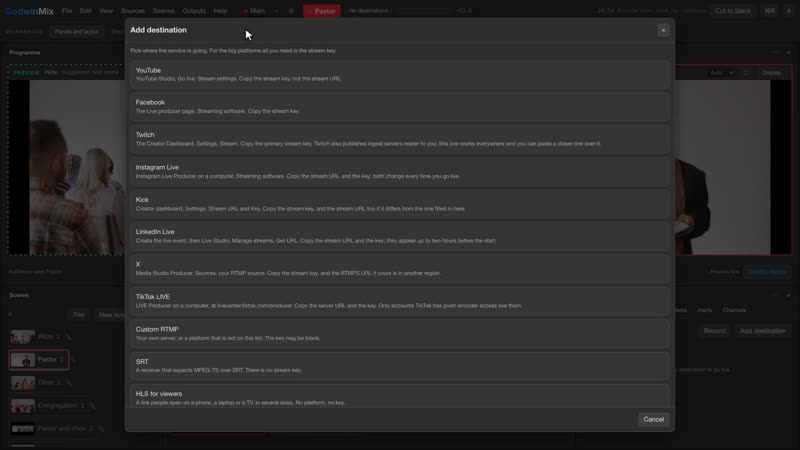
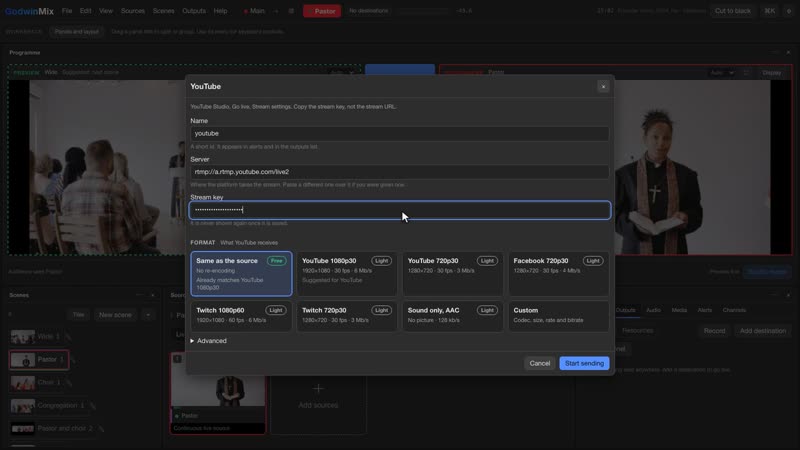
  5. Open Outputs, then Add destination, once for each site: YouTube, Facebook, Twitch. Each row says Live when it is sending.
  6. Press Record, then Start recording, for a file on the laptop. The red REC pill at the top shows it is running.
  7. Today: build one scene per camera and test the score bug in a practice game.
How to0:47

Bring a guest in from a phone

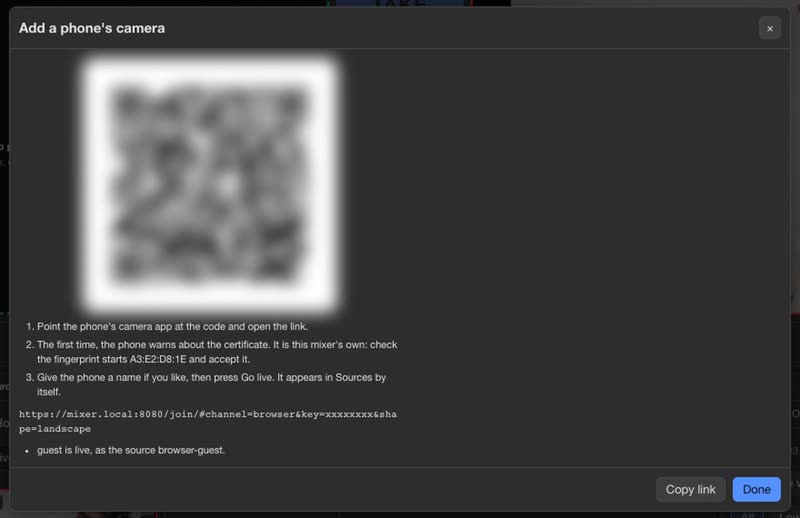
WHAT YOU WILL LEARNSend a guest a code, see her arrive as a source, put a side by side scene with her name card on air, and stream and record it.
Read the steps
  1. Let phones reach the mixer once: Help, then Open on another device, then Allow other devices.
  2. In Sources press Add sources, then Cameras, and press Show code beside A phone’s camera.
  3. Send the guest the link or let her scan the code. The first time her phone asks about the certificate; it is the mixer’s own, and the dialog shows its fingerprint.
  4. She types a name and presses Go live. The dialog says she is live, and she is a source like any camera.
  5. Make a scene with you and the guest side by side and put a lower third on it from Graphics. Pick the scene, choose Wipe and press Take. The name card comes up with the scene.
  6. Add your destinations under Outputs and press Record to keep a copy.
  7. Today: send yourself the link and test it from another room.
How to1:10

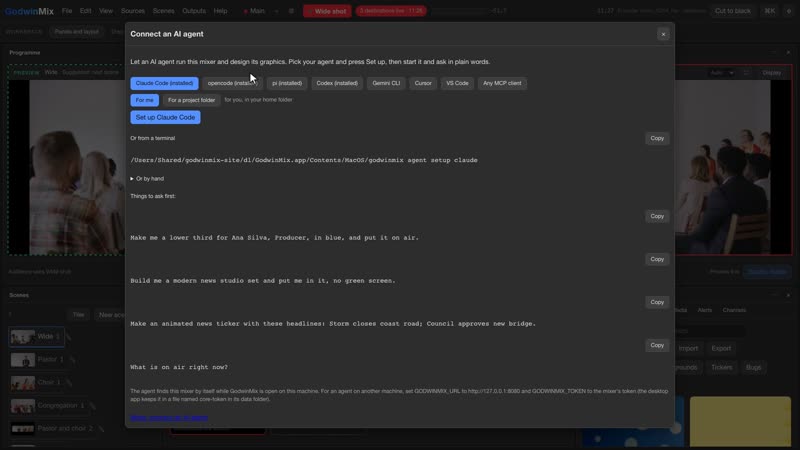
Ask an AI agent to run the routine jobs

WHAT YOU WILL LEARNConnect Claude Code or another agent, have it build scenes and a speaker’s lower third from one request, and give it more jobs during the day.
Read the steps
  1. Open Help, then Connect an AI agent, and press Set up beside the agent you use: Claude Code, Codex, Gemini CLI, Cursor and others.
  2. Ask in plain words, for example: make one scene per camera, put Daniel Okafor, Keynote, as a lower third on the stage scene, and take it live with a fade.
  3. The agent builds the scenes, fills in the lower third, takes the stage shot, and looks at a snapshot of the programme before it answers.
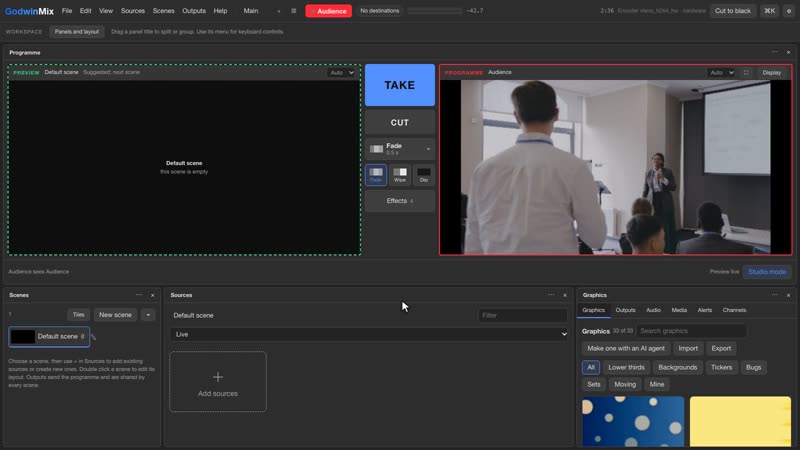
  4. Give it more as you go, such as: set the room camera as the backup for the stage camera, then cut to the audience with a wipe.
  5. Everything it does is an ordinary action in the mixer. You can take another shot at any moment.
  6. Today: at your next rehearsal, try one prompt, like putting the first speaker’s name on screen.
How to1:12

Watch a headend of many channels

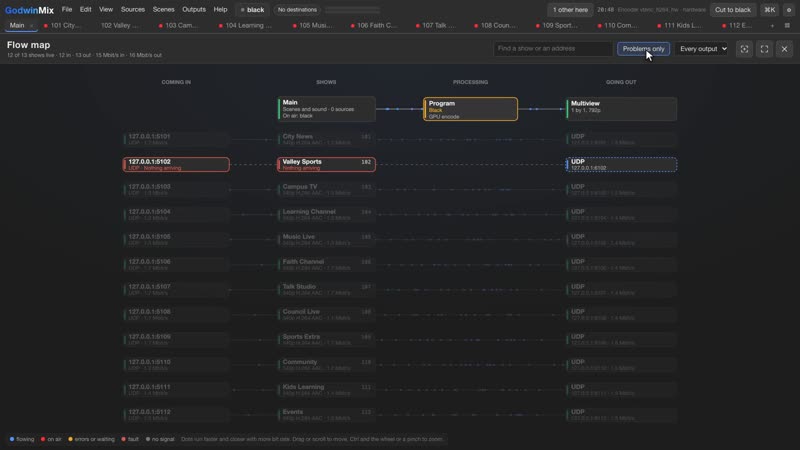
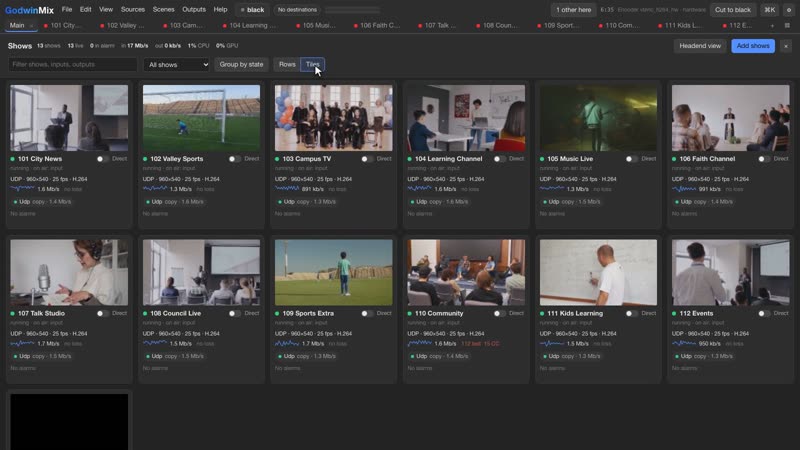
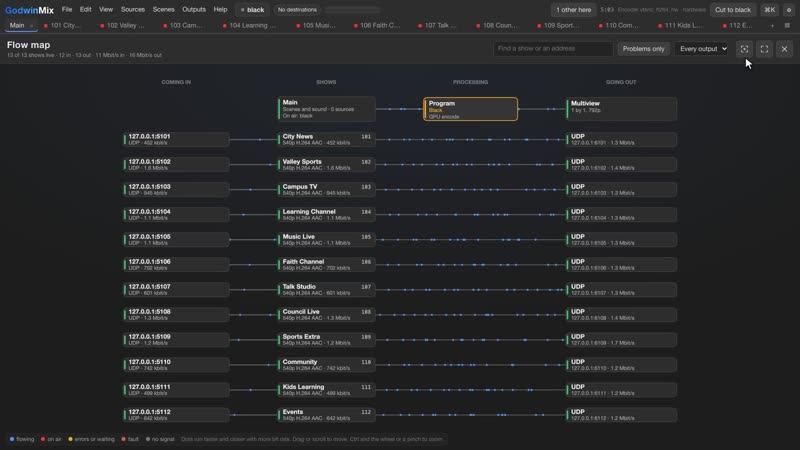
WHAT YOU WILL LEARNAdd many channels from a CSV in one command, watch them all in the headend view, find a dead feed with Problems only, and read the station on the flow map.
Read the steps
  1. Write your channels in a CSV with the columns name,input,program,outputs,format. A format of copy passes the input through without decoding it.
  2. Run gmx shows add --from feeds.csv --dry-run to see what it would add and cost, then run it again without the dry run.
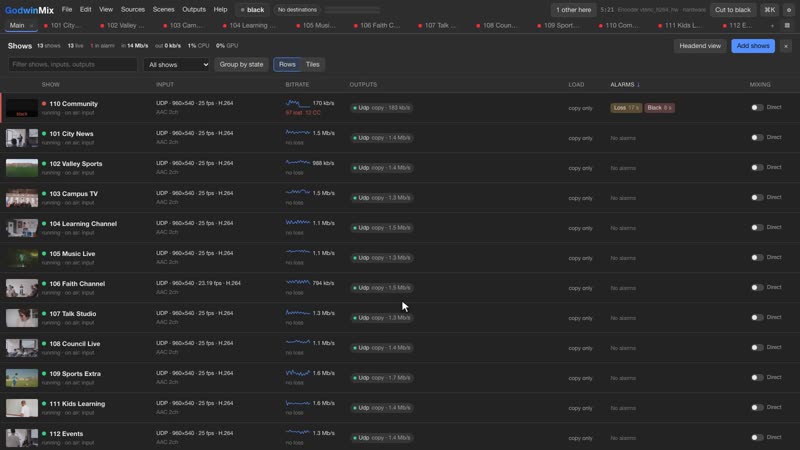
  3. Open View, then Headend. Each channel is a tile with its picture, rates and sound meter. The band at the top is the machine; on a server with an NVIDIA card a GPU strip shows the encoder and decoder load.
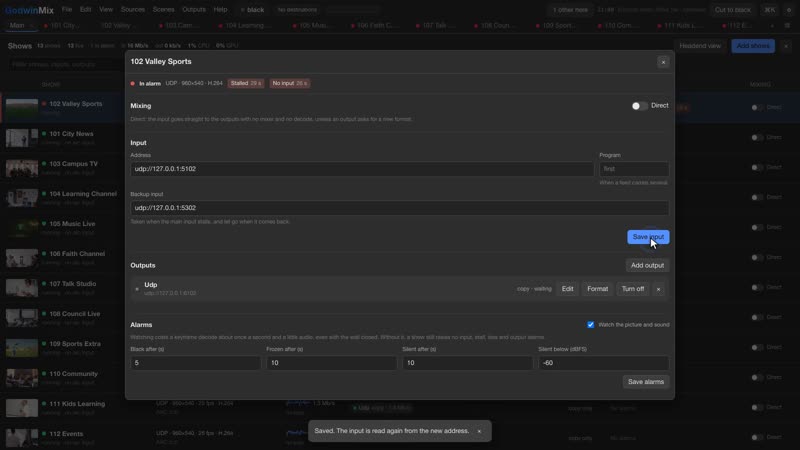
  4. When a feed stops, its tile says Offline. Press Problems only to hide every channel that is fine.
  5. Click a tile for its tracks, outputs and input history. When the feed returns, the tile goes back to Live by itself.
  6. Open the flow map from the first button at the top right to see every input, channel and output with its rate.
  7. Today: put your channel list in a CSV and try the dry run.
How to1:19

When a camera dies, keep the show on air

WHAT YOU WILL LEARNGive each camera a backup shot, see what happens on air when its cable comes out, and how it comes back by itself.
Read the steps
  1. Without a backup, people at home see the picture freeze and then go black until someone notices.
  2. Open the camera’s settings from the gear on its tile.
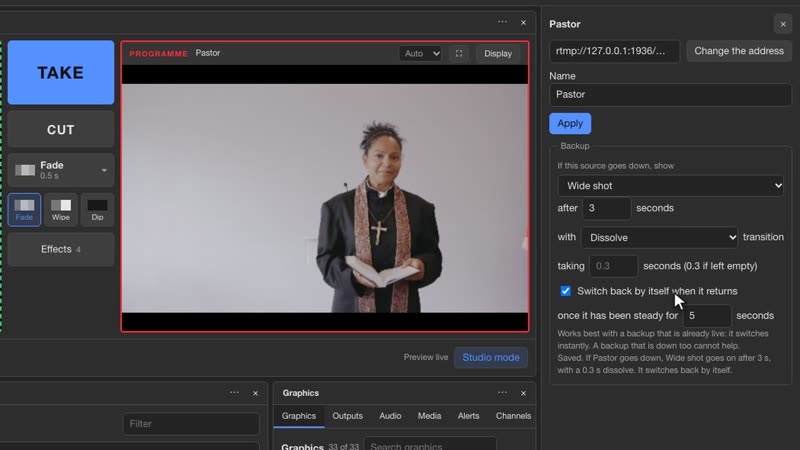
  3. Under Backup, in If this source goes down, show, pick a shot that is always running. A wide shot is a good choice.
  4. Leave it at 3 seconds with a Dissolve. Keep Switch back by itself when it returns ticked, with 5 steady seconds. The line underneath says what will happen.
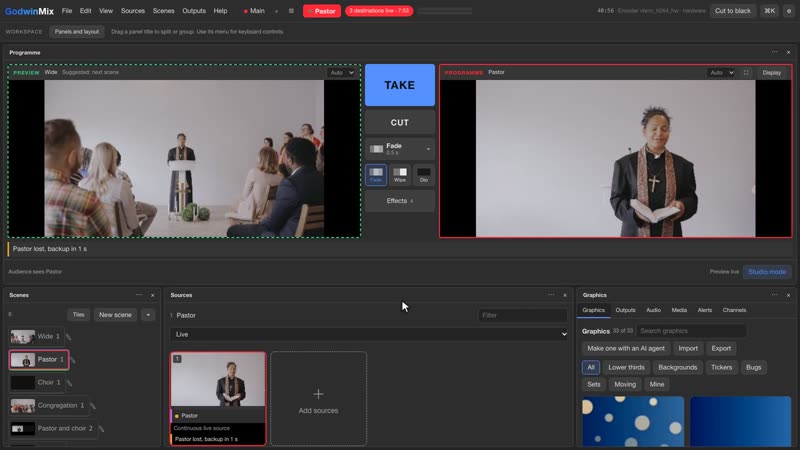
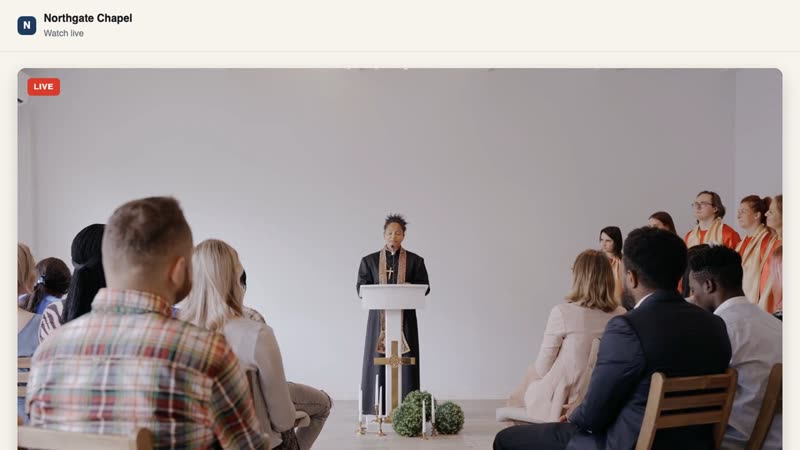
  5. When the camera drops, its tile says it is lost and counts down. The backup dissolves in, in every scene that used that camera, and every destination stays live.
  6. When the camera returns and has been steady for 5 seconds, it dissolves back on its own. You can also press Return now, or stay on the backup.
  7. Today: give every camera a backup, and test it once by pulling a cable in rehearsal.

The films use test setups: platform destinations point at a test server on the same computer, the footage is free stock video from Pexels, and the teams, speakers, guests and channels are made up. The agent replies are from real sessions, shortened. The sports, podcast, agent and headend films were recorded on GodwinMix 0.3.17, the backup film on 0.3.13. The overview is also cut for social media: vertical and square.

04CUE 07:40The real screens

What you will see when you open it.

05CUE 09:30In production
On air around the clock
52

live channels set up for a US broadcaster on one GodwinMix headend.

Since October 2026 a GodwinMix headend carries the broadcaster's channels on one server with one GPU, in place of the commercial streaming server it used before. The channels play on the broadcaster's own watch site.

CH01CH02CH03CH04CH05CH06CH07CH08CH09CH10CH11CH12CH13CH14CH15CH16CH17CH18CH19CH20CH21CH22CH23CH24CH25CH26CH27CH28CH29CH30CH31CH32CH33CH34CH35CH36CH37CH38CH39CH40CH41CH42CH43CH44CH45CH46CH47CH48CH49CH50CH51CH52

Illustration of the channel count. The broadcaster's channels are not shown.

The team behind it has run live video since 2011.

GodwinMix comes from the same people who built Livebox, a streaming platform sold as a cloud service, a server and a box, and Instanet, a router that joins several internet lines so a broadcast stays online. Ripeflow LLC in Manassas, Virginia now builds, deploys and supports GodwinMix.

1,500+streaming servers set up, 2018 to 2023
About 1,100customers on those servers
868receivers, encoders and bonding routers licensed
40branded Android apps built for TV channels, about

Past deployments include a High Court, a state government, a hospital group and a paramilitary force, named by sector only.

06CUE 11:00What others cost

What the usual tools cost, from their own price pages.

We only list what each vendor publishes. Feature lists change, so check them yourself before you choose.

ProductKindPublic priceSource
GodwinMixSoftware mixer, open source, Apache 2.0$0, any use including commercialgithub.com/psmux/GodwinMix
vMix HD / 4K / ProSoftware mixer$350 / $700 / $1,200 lifetime, per computer. MAX is $50 a monthvmix.com/purchase
Wirecast Studio / ProSoftware mixer, subscription$34 / $42 a month billed yearly; $59 / $79 billed monthlywirecast.io/pricing
ATEM Mini Pro / Extreme / Extreme ISO G2Hardware switcher$445 / $1,249 / $3,479blackmagicdesign.com
Restream Standard / ProfessionalMultistreaming service$19 / $49 a monthrestream.io/pricing

Prices read on 25 October 2026. Coming from OBS? GodwinMix imports your OBS scene collection and reports anything it skipped.

07CUE 12:00Work with us

The people who build it will set it up with you.

Ripeflow LLC sets GodwinMix up for leagues, schools, event crews, studios, churches and channel operators. We also train the people who run it, and we build the features a show is missing.

Setup

We get your first show on air

We install it on your computer or server, add your cameras and destinations, set backups and test a full rehearsal with you.

Training

We train your crew

A session on your own setup: Preview and Take, phones, graphics, what to do when something drops. With written steps to keep.

Support

You can call us on show days

Help before and during your shows, updates checked against your setup, and remote help when something looks wrong.

Custom features

We build what your show needs

Plugins, graphics, integrations and headend work for channel operators, built on the same open source code.

See it working with your own cameras.

Book a demo and we will walk through your own setup with you.

Book a demo
08CUE 13:15Questions

Questions people ask before the first show.

Is it really free?

Yes. GodwinMix is licensed under Apache 2.0, free for any use including commercial. You pay only if you want our setup, training, support or custom work.

What computer do I need?

A Windows, Mac or Linux computer. It uses the hardware video encoder where the computer has one. It also runs without a screen on a server, in Docker or on a Raspberry Pi.

Which platforms can it stream to?

The destination list has YouTube, Facebook, Twitch, Instagram Live, Kick, LinkedIn Live, X, TikTok LIVE, any custom RTMP server, SRT, and HLS for viewers, which gives your own website a link and a QR code. Several can run at once from one encoder.

What happens when a camera or the internet drops?

A camera with a backup set is replaced after 3 seconds and returns once it has been steady for 5. A destination that drops keeps reconnecting by itself while the others carry on, and the programme does not stop.

Can we use phones as cameras or controllers?

Both. A phone can join as a camera by scanning a code, and a phone can run the show with its own code, which you can take back at any time.

We use OBS today. Can we move?

Yes. GodwinMix imports an OBS scene collection and reports anything it skipped. GodwinMix is not affiliated with the OBS Project.

Does the AI agent need an account with you?

No. GodwinMix has an MCP server built in. Any MCP client you already use, such as Claude Code, Codex, Gemini CLI or Cursor, can connect from Help, Connect an AI agent.

Who do we call when something goes wrong?

Ripeflow LLC. Support is part of our engagement. Book a call through the contact page and we will agree how to reach us on show days.

09CUE 14:00Download

Download GodwinMix 0.3.17.

All files and checksums: github.com/psmux/GodwinMix/releases. For a server, the Docker image is ghcr.io/psmux/godwinmix. Source code and documentation: github.com/psmux/GodwinMix.